


More Orders, Less Paperwork.
NewConstruction Plan Analysis: From Plan to Ready Quote in MinutesIs your craft business suffering from missed calls, time-consuming bureaucracy, and slowed-down processes? DivineMind.AI transforms your way of working. Intelligent agents handle routine tasks, secure revenue, and relieve your team – around the clock, precisely and efficiently.
Upload a Construction Plan. Get a Quote.
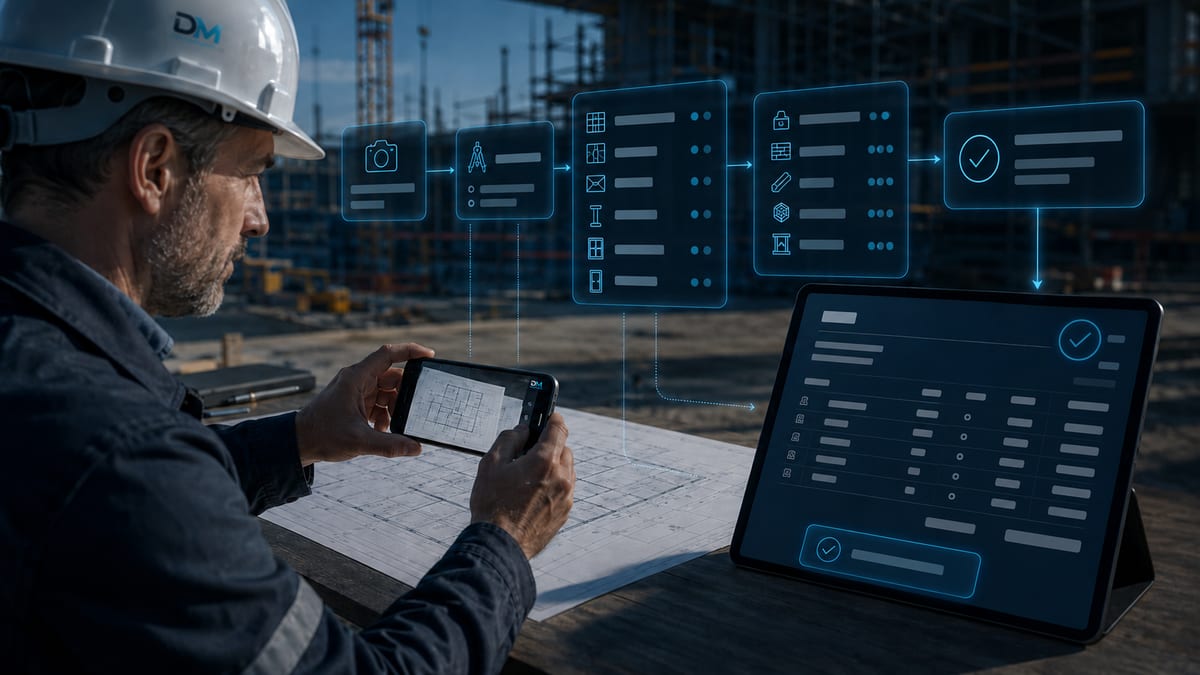
PDF or photo is enough: The Vision AI recognizes building components, quantities, and standards, matches everything with your product catalog, and creates a ready-to-send quote — or a shopping list for your own project.
- 01
Upload Construction Plan
PDF, PNG, JPG, or WEBP — even multiple plans per analysis. Optionally, you can provide hints to the AI, e.g., “Focus on shell construction” or “Standard: ÖNORM”.
- 02
AI Recognizes Building Components
The Vision AI reads plan type, scale, and standards, and recognizes building components such as foundations, walls, and ceilings — including quantities and confidence score.
- 03
Match with Your Catalog
Each recognized item is matched with your product catalog and adopted with your prices and tax rates. If a material is missing, you can create it as a product with a click.
- 04
Quote or Shopping List
You review the items and adjust quantities and prices — net, VAT, and total sum are calculated live. Then you send the quote or print the list.
Two Ways — One Upload.
The same analysis, two results: You decide what becomes of your construction plan.
Customer Quote
A customer inquires based on a construction plan? The analysis becomes a real quote directly in your Finance Module.
- Select customer from CRM — or start directly from the customer file
- Refine items, template, and cover letter in the quote editor
- Send as PDF — the quote is neatly stored in the Finance Module
Own Project / Shopping List
You have received a plan and want to know what material you need? No customer required.
- Material list with quantities directly from the plan analysis
- Prices from your own product catalog
- Print or save as PDF — ready for procurement
Your craft is demanding. Is your bureaucracy too?
The site diary writes itself.
Your employees and subcontractors clock in directly on the construction site via the AIRIS employee area, report events by voice or photo — and the AI automatically generates the daily report per construction site.

Shell construction ground floor completed. Brick delivery documented at 14:20, scaffolding erected on south side.
- 01
Clocking in on the Construction Site
Employees and subcontractors open AIRIS on their mobile phones and clock in at their construction site — if multiple construction sites are assigned, AIRIS automatically asks. The foreman, workers, and subcontractors each have their own role.
- 02
Reporting Instead of Paperwork
Material delivery, subcontractor arrival, or a problem with a mandatory photo: three quick reports, by text or voice recording — directly from the scaffolding.
- 03
Dictate When Clocking Out
At the end of the day, briefly state what happened today. The AI writes the daily report from this — with weather, attendance, and hours per construction site. The foreman can have it regenerated at any time.
From bill of quantities file to final invoice.
Import tenders, record quantity takeoffs, bill according to construction progress: DivineMind.AI covers the entire commercial construction process — in compliance with Austrian ÖNORM standards.

Bill of Quantities according to ÖNORM A2063
Import and export bills of quantities as data files — with trade breakdown down to the item level. Every offer can be converted into a standard-compliant data file with a click.
Quantity Takeoff & Construction Billing
Record quantity takeoffs per item, view live progress, and generate progress invoices from them — the final invoice automatically balances all interim payments.
Change Orders as Documentation
Change order proposals with their own NA numbering sequence, reference to the main offer, and status from open to awarded — awarded change orders are included in the budget vs. actual calculation.
Budget vs. Actual per Construction Site
Offer sum against actual labor hours, invoices, and material costs — with a traffic light system that indicates cost overruns before they become expensive.
Construction Schedule
Processes per construction site as a Gantt chart with progress and delay indicators — you can identify delayed trades at a glance.
Daywork Report with Signature
Daywork services as a PDF report with workers, hours, and events — signed directly on-site via mobile phone.

From plan to walk-through 3D model.
The AI transforms the 2D floor plan into a furnished 3D model that your client understands — without CAD software, without an expensive BIM license.
- Upload floor plan — walk-through 3D in minutes
- IFC and GLB export for BIM workflows
- Share with clients via QR code — no login required
The building permit file is intelligent.
Submission checklists for all 9 Austrian federal states, status tracking from draft to official decision — and the submission dossier as a PDF.
- Checklists per federal state — e.g., Vienna (MA 37)
- Submission dossier as PDF at the touch of a button
- Public verification API for authorities & partners
What AI is currently changing in the construction industry.
Three developments you should be aware of in 2026 — and where DivineMind comes in.

The surge is happening now. DivineMind bundles tools that are otherwise spread across five apps into a single stack — from the initial call to the final invoice.
Every AI-supported action will require a traceable audit trail starting this summer. DivineMind logs calls, emails, and job proposals in compliance with GoBD and the AI Act — without an additional tool.
Those who start early have the leverage — especially in an industry with a chronic shortage of skilled workers. AIRIS answers calls, writes quotes, and manages the construction logbook.
Sources: DACH-Branchenreport 2026 · ServiceTitan Commercial Specialty Contractor Report 2026 · Bluebeam AEC Technology Outlook 2026 · handwerk-magazin Juni 2026. As of June 2026.
DivineMind.AI: Intelligent Solutions for Your Daily Business
Optimize your core processes with autonomous AI agents and refocus on your craft.

Secure Order Inquiries 24/7
↳ Missed calls on the construction site mean lost orders and dissatisfied customers.
→ Divine Call answers calls around the clock, precisely qualifies inquiries, and schedules appointments – no call goes unanswered.
Digital and Mobile Time Tracking
↳ Manual timesheets cause errors, delay payroll, and tie up valuable office time.
→ With the mobile time clock, your employees record their hours right on the construction site – assigned to the respective site. Data flows directly into DATEV – precisely, according to GoBD standards, and without delay.
Create Quotes in Minutes
↳ Creating quotes takes hours, based on handwritten notes or blueprints.
→ Photo-to-Quote extracts items and quantities from photos or plans. AIRIS creates detailed, precise quotes in less than a minute – error-free and at the touch of a button.
Subcontractors & Crew Under Control
↳ Coordinating subcontractor assignments, hours, and material proofs is laborious and error-prone.
→ DivineMind.AI's AIRIS subcontractor area gives every sub their own access: subcontractors clock in themselves, report deliveries and issues via photo or voice, and file their proofs – the AI turns this into the daily report per construction site.
Your Investment. Your Profit. Our Promise.
DivineMind.AI costs €749 per user per month (€999 with AIRIS). Calculate for yourself how much you save by cutting the costs of a part-time employee while simultaneously increasing your revenue.
Since DivineMind.AI manages our calls and time tracking, we save at least 80 hours of office time per month. This has revolutionized our productivity and allows us to focus on our craft again.
Frequently Asked Questions

How quickly is DivineMind.AI ready for use?+
The implementation of DivineMind.AI is typically completed within a few days. Our experts guide you through the entire process, from setting up the AI agents to training your team, so you can quickly benefit from the advantages.
What are the costs for DivineMind.AI?+
DivineMind.AI offers transparent monthly costs of €749 per user. For businesses that wish to use the extended AIRIS, the price is €999 per user per month. There are no hidden fees or different pricing tiers.
How are data security and DSGVO compliance ensured?+
Data security and DSGVO compliance are top priorities at DivineMind.AI. All data is hosted on German servers and encrypted according to the strictest standards. Our systems are designed for GoBD compliance and take into account the requirements of the EU AI Act to protect your data at all times.
Can DivineMind.AI be integrated with existing systems like DATEV?+
Yes, DivineMind.AI is designed to integrate seamlessly into your existing IT infrastructure. We offer interfaces to common systems like DATEV for payroll and financial administration, as well as support for XRechnung. Our agents learn your processes and systems to ensure maximum efficiency.
What added value does AIRIS offer in my craft business?+
AIRIS is the central orchestrator of all DivineMind.AI agents and your intuitive access to the AI world. It allows you to automate complex workflows, intelligently link all data, and benefit from proactive analyses. With AIRIS, you always have an overview and control over all automated processes.
Which construction plans can the construction plan analysis process?+
You upload floor plans, sections, or detailed plans as PDF, PNG, JPG, or WEBP — even multiple files per analysis, with up to 25 MB per file. The AI automatically recognizes plan type, scale, and standards and shows you a confidence score for each analysis. You can control the analysis via a hint field, for example, “Focus on shell construction” or “Standard: ÖNORM”.
Where do the prices in the automatically generated quote come from?+
From your own product catalog: Each recognized item is matched against your products and adopted with your prices and tax rates. If the AI recognizes material that is not yet in the catalog, you can create it directly from the analysis with a click. Before sending, you review all items and adjust quantities or prices as needed.
How does the site diary work for employees and subcontractors?+
Employees and subcontractors clock in and out directly on the construction site via the AIRIS employee area — on their own mobile phone, without an additional app. During the day, they report material deliveries, subcontractor arrivals, or problems with a photo, by text or voice recording. When clocking out, they briefly dictate what was completed. From all of this, the AI automatically creates the daily report per construction site — with weather, attendance, and hours. In the office, you see each construction site with crew, subcontractors, photo gallery, and hours overview in one file.
Industry-specific AI insights — weekly
Each Wednesday a case from your industry: what works, what doesn't, what it really costs.
Unleash the full potential of your craft.
Schedule a personal demo today and experience how DivineMind.AI transforms your business.
Or write to us directly.
Please briefly describe your needs — we will get back to you within 24 hours.